[]
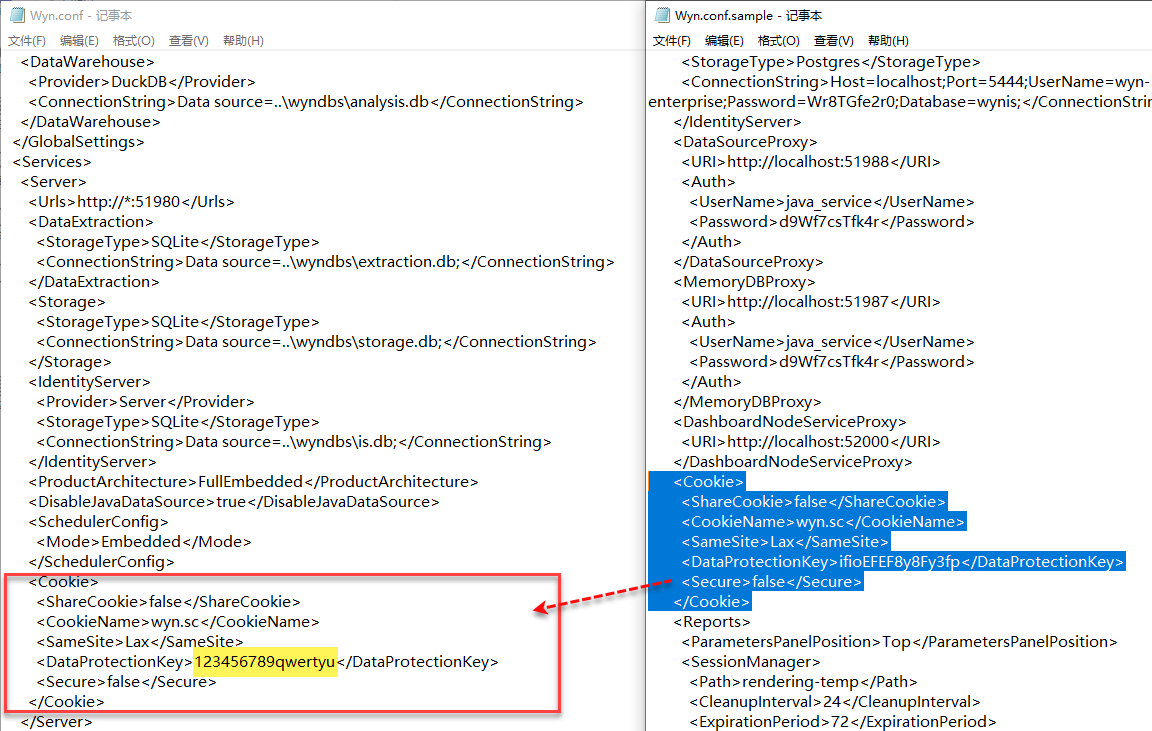
系统内部默认已经共享Cookie,使用了一个固定的 加密key。实际应用场景中,您也可以修改这个加密key,进行自定义。
1. 找到 Server 服务器中安装路径下的 Wyn.conf 和参考文件Wyn.conf.sample。
标准版: Windows环境中配置文件的默认路径为 C:\\Program Files\\Wyn\\conf ,Linux环境下为 /opt/Wyn/conf/
集群版: Windows环境中配置文件的默认路径为 C:\\Program Files\\Wyn\\Monitor\\conf ,Linux环境下为 /opt/Wyn/Monitor/conf/
type=info
注意:
请将Wyn.conf文件备份后再进行修改操作,以备修改过程中对比内容或恢复文件时使用。
如需在原路径下进行修改,请使用管理员权限打开Wyn.conf文件。
将参考文件Wyn.conf.sample 中<Cookie>相关内容分别拷贝到配置文件Wyn.conf 的 <Server> 节点下,并修改加密key。
图中以标准版为例截图。