[]
特殊单元格范围是指包含指定数据类型或值的范围。例如,包含注释、文本值、公式、空格、常量、数字等的单元格。
GcExcel允许您使用IRange接口的specialCells方法获取特殊单元格范围。它将以下枚举作为参数:
SpecialCellType: 指定单元格的类型,如公式、常量、空白等。
SpecialCellsValue: 指定具有特定类型值(如数字、文本值等)的单元格。
下表列出了SpecialCellType和SpecialCellsValue枚举允许查找的单元格或值的类型:
枚举 | 类型 | 描述 |
|---|---|---|
SpecialCellType | AllFormatConditions | 指定范围内任何格式条件的单元格。 |
AllValidation | 在指定范围内具有验证条件的单元格。 | |
Blanks | 指定范围内的空单元格。 | |
Comments | 在指定范围内包含注释的单元格。 | |
Constants | 包含常数的单元格。使用 SpecialCellsValue 按数据类型过滤值。 | |
Formulas | 包含公式的单元格。使用 SpecialCellsValue 按返回类型过滤公式。 | |
LastCell | 指定范围内工作表中使用范围内的最后一个可见单元格。 | |
MergedCells | 与指定范围相交的合并单元格。 | |
SameFormatConditions | 具有与指定范围左上角单元格相同格式的单元格。 | |
SameValidation | 具有与指定范围左上角单元格相同验证条件的单元格。 | |
Visible | 指定范围内所有可见单元格。 | |
Tags | 在指定范围内包含Tags的单元格。 | |
SpecialCellsValue | Errors | 具有错误的单元格。 |
Logical | 具有逻辑值的单元格。 | |
Numbers | 具有数字值的单元格。 | |
TextValues | 具有文本的单元格。 |
请参阅以下示例代码,通过指定单元格类型来查找特殊单元格的范围。
// Create a new workbook.
Workbook workbook = new Workbook();

// Get active sheet.
IWorksheet ws = workbook.getActiveSheet();

// Add data to the range.
Object[][] rngA1D2 = new Object[][] { { "Register", null, null, null },
        { "Field name", "Wildcard", "Validation error", "User input" } };
ws.getRange("$A$1:$D$2").setValue(rngA1D2);

Object[][] rngA3C6 = new Object[][] { { "User name", "??*", "At least 2 characters" },
        { "Captcha", "?????", "5 characters required" }, { "E-mail", "?*@?*.?*", "The format is incorrect" },
        { "Security code", "#######", "7 digits required" } };
ws.getRange("$A$3:$C$6").setValue(rngA3C6);

Object[][] rngA8D14 = new Object[][] { { "User table", null, null, null }, { "Id", "Name", "Email", "Banned" },
        { 1d, "User 1", "8zgnvlkp2@163.com", true }, { 2d, "User 2", "b9fvaswb@163.com", false },
        { 3d, "User", "md78b", false }, { 4d, "User 4", "1qasghjfg@163.com", false },
        { 5d, "U", "mncx23k8@163.com", false } };
ws.getRange("$A$8:$D$14").setValue(rngA8D14);

ws.getRange("A1:D1").merge();
ws.getRange("A1:D1").setHorizontalAlignment(HorizontalAlignment.Center);
ws.getRange("A8:D8").merge();
ws.getRange("A8:D8").setHorizontalAlignment(HorizontalAlignment.Center);

ws.getRange("A9").setTag("Number type");
ws.getRange("B9").setTag("Text type");
ws.getRange("C9").setTag("Text type");
ws.getRange("D9").setTag("Bool type");

ws.getRange("D3").addComment("Required");
ws.getRange("D4").addComment("Required");
ws.getRange("D5").addComment("Required");
ws.getRange("D6").addComment("Required");

ws.getRange("D10:D14").getValidation().add(ValidationType.List, ValidationAlertStyle.Stop,
        ValidationOperator.Between, "True,False", null);

IFormatCondition condition = (IFormatCondition) ws.getRange("C10:C14").getFormatConditions().add(
        FormatConditionType.Expression, FormatConditionOperator.Between, "=ISERROR(MATCH($B$5,C10,0))", null);
condition.getFont().setColor(Color.GetRed());

IFormatCondition condition2 = (IFormatCondition) ws.getRange("B10:B14").getFormatConditions()
        .add(FormatConditionType.Expression, FormatConditionOperator.Between, "=LEN(B10)<=2", null);
condition2.getFont().setColor(Color.GetRed());

ws.getRange("4:4").getEntireRow().setHidden(true);

IRange searchScope = ws.getRange("1:14");

// Find comments.
IRange comments = searchScope.specialCells(SpecialCellType.Comments);

// Find last cell.
IRange lastCell = searchScope.specialCells(SpecialCellType.LastCell);

// Find visible.
IRange visible = searchScope.specialCells(SpecialCellType.Visible);

// Find blanks.
IRange blanks = searchScope.specialCells(SpecialCellType.Blanks);

// Find all format conditions.
IRange allFormatConditions = searchScope.specialCells(SpecialCellType.AllFormatConditions);

// Find all validation.
IRange allValidation = searchScope.specialCells(SpecialCellType.AllValidation);

// Find same format condition as B10.
IRange sameFormatConditions = ws.getRange("B10").specialCells(SpecialCellType.SameFormatConditions);

// Find same validation as D10.
IRange sameValidation = ws.getRange("D10").specialCells(SpecialCellType.SameValidation);

// Find merged cells.
IRange merged = searchScope.specialCells(SpecialCellType.MergedCells);

// Find cells containing tags.
IRange tagCells = searchScope.specialCells(SpecialCellType.Tags);

// Add output of above search to the range.
ws.getRange("A16").setValue("Find result");
ws.getRange("A16:C16").merge();
ws.getRange("A16:C16").setHorizontalAlignment(HorizontalAlignment.Center);
ws.getRange("$A$17:$A$26").setValue(new Object[][] { { "Comments" }, { "LastCell" }, { "Visible" }, { "Blanks" },
                { "AllFormatConditions" }, { "AllValidation" }, { "SameFormatConditions B10" },
                { "SameValidation D10" }, { "MergedCells" }, { "TagCells" } });
ws.getRange("$C$17:$C$26").setValue(new Object[][] { { comments.getAddress() }, { lastCell.getAddress() },
                { visible.getAddress() }, { blanks.getAddress() }, { allFormatConditions.getAddress() },
                { allValidation.getAddress() }, { sameFormatConditions.getAddress() },
                { sameValidation.getAddress() }, { merged.getAddress() }, { tagCells.getAddress() } });

ws.getUsedRange().getEntireColumn().autoFit();

// Save the excel file.
workbook.save("SpecialCellsFindMiscellaneous.xlsx");请参阅以下示例代码以加载现有文件,查找包含公式和常量的特殊单元格并更改其背景色。
// Create a new workbook
Workbook workbook = new Workbook();
workbook.open("FinancialReport.xlsx");
IRange cells = workbook.getActiveSheet().getCells();
// Find all formulas
IRange allFormulas = cells.specialCells(SpecialCellType.Formulas);
// Find all constants
IRange allConstants = cells.specialCells(SpecialCellType.Constants);
// Change background color of found cells
allFormulas.getInterior().setColor(Color.GetLightGray());
allConstants.getInterior().setColor(Color.GetDarkGray());
// Save to an excel file
workbook.save("SpecialCellsInExistingFiles.xlsx");请参阅以下示例代码,通过指定单元格类型和值来查找特殊单元格。
// create a new workbook
Workbook workbook = new Workbook();
IWorksheet ws = workbook.getActiveSheet();

// Set data
ws.getRange("A1").setFormula("=\"Text \" & 1");
ws.getRange("B1").setFormula("=8*10^6");
ws.getRange("C1").setFormula("=SEARCH(A1,9)");
ws.getRange("A2").setValue("Text");
ws.getRange("B2").setValue(1);

// Find text formulas
IRange textFormula = ws.getCells().specialCells(SpecialCellType.Formulas, SpecialCellsValue.TextValues);
// Find number formulas
IRange numberFormula = ws.getCells().specialCells(SpecialCellType.Formulas, SpecialCellsValue.Numbers);
// Find error formulas
IRange errorFormula = ws.getCells().specialCells(SpecialCellType.Formulas, SpecialCellsValue.Errors);
// Find text values
IRange textValue = ws.getCells().specialCells(SpecialCellType.Constants, SpecialCellsValue.TextValues);
// Find number values
IRange numberValue = ws.getCells().specialCells(SpecialCellType.Constants, SpecialCellsValue.Numbers);

// Display search result
ws.getRange("A4:E5")
        .setValue(new Object[][] {
                { "Text formula", "Number Formula", "Error Formula", "Text Value", "Number Value" },
                { textFormula.getAddress(), numberFormula.getAddress(), errorFormula.getAddress(),
                        textValue.getAddress(), numberValue.getAddress() } });

ws.getUsedRange().getEntireColumn().autoFit();

// save to an excel file
workbook.save("SpecialCellsQuickStart.xlsx");
请参阅以下示例代码,按单元格类型和值查找特殊单元格范围。
// Create a new workbook
Workbook workbook = new Workbook();
IWorksheet ws = workbook.getWorksheets().get(0);

ws.getRange("A1:F1").setValue(new Object[][] {
        { "Test id", "Group id", "Group item id", "New test id", "Test result", "Error code" } });

ws.getRange("B2:C2").setValue(1d);
ws.getRange("E2,E7,E12,E21,E27,E36,E40,E47:E48,E51,E59:E60,E70:E71,E80:E81,E88,E90:E91")
        .setValue("Error 80073cf9");
ws.getRange("G1:G2,I1:I7,H8:I8,A93:B93,E93:F93").setValue(null);

ws.getRange("H1:H7").setValue(new Object[][] { { "Constants" }, { "Formulas" }, { "String constants" },
        { "Number constants" }, { "String formulas" }, { "Number formulas" }, { "Error formulas" } });

ws.getRange("A2:A13").setValue("Test00001");
ws.getRange("A14:A67").setValue("Test00153");
ws.getRange("A68:A92").setValue("Test05789");
ws.getRange("E3:E5,E9:E11,E25:E26,E37:E38,E57,E75:E76,E86:E87").setValue("Runtime Error c0000005");
ws.getRange("E6,E13:E20,E28:E35,E41:E46,E52:E56,E61:E64,E72:E74,E77:E78,E82:E85,E89,E92").setValue("Passed");
ws.getRange("E8,E22:E24,E39,E49:E50,E58,E65:E69,E79").setValue("Deploy Error 80073cf9");

ws.getRange("D2:D92").setFormulaR1C1("=\"X-Test-G\" & RC[-2] & \"-I\" & RC[-1]");
ws.getRange("B3:B92").setFormulaR1C1("=IF(RC[-1]=R[-1]C[-1],R[-1]C,R[-1]C+1)");
ws.getRange("C3:C92").setFormulaR1C1("=IF(RC[-2]=R[-1]C[-2],R[-1]C+1,1)");
ws.getRange("F2:F92").setFormulaR1C1("=MID(RC[-1], SEARCH(\"Error \",RC[-1])+6,8)");

Color constantBgColor;
Color formulasBgColor;
Color stringForeColor;
Color errorForeColor;
{
    constantBgColor = Color.FromArgb((int) 0xFFDDEBF7);
    formulasBgColor = Color.FromArgb((int) 0xFFF2F2F2);
    stringForeColor = Color.FromArgb((int) 0xFF0000C0);
}
errorForeColor = Color.GetDarkRed();
IRange searchScope = ws.getRange("A:F");

// Find constant cells and change background color
IRange allConsts = searchScope.specialCells(SpecialCellType.Constants);
allConsts.getInterior().setColor(constantBgColor);

// Find formula cells and change background color
IRange allFormulas = searchScope.specialCells(SpecialCellType.Formulas);
allFormulas.getInterior().setColor(formulasBgColor);

// Find text constant cells and change foreground color
IRange textConsts = searchScope.specialCells(SpecialCellType.Constants, SpecialCellsValue.TextValues);
textConsts.getFont().setColor(stringForeColor);

// Find text formula cells and change foreground color
IRange textFormulas = searchScope.specialCells(SpecialCellType.Formulas, SpecialCellsValue.TextValues);
textFormulas.getFont().setColor(stringForeColor);

// Find number constant cells and change font weight
IRange numberConsts = searchScope.specialCells(SpecialCellType.Constants, SpecialCellsValue.Numbers);
numberConsts.getFont().setBold(true);

// Find number formula cells and change font weight
IRange numberFormulas = searchScope.specialCells(SpecialCellType.Formulas, SpecialCellsValue.Numbers);
numberFormulas.getFont().setBold(true);

// Find error formula cells and change foreground color and font style
IRange errorFormulas = searchScope.specialCells(SpecialCellType.Formulas, SpecialCellsValue.Errors);
errorFormulas.getFont().setColor(errorForeColor);
errorFormulas.getFont().setItalic(true);

// Set sample cell styles
ws.getRange("H1,H3,H4").getInterior().setColor(constantBgColor);
ws.getRange("H2,H5:H7").getInterior().setColor(formulasBgColor);
ws.getRange("H3,H5").getFont().setColor(stringForeColor);
ws.getRange("H4,H6").getFont().setBold(true);
ws.getRange("H7").getFont().setColor(errorForeColor);
ws.getRange("H7").getFont().setItalic(true);

ws.getUsedRange().getEntireColumn().autoFit();

// Save to an excel file
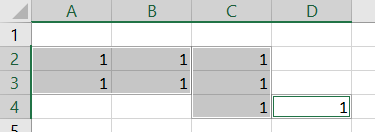
workbook.save("SpecialCellsFindValuesAndFormulas.xlsx");当结果包含多个相邻矩形的单元格区域时,GcExcel返回的范围在策略上与Excel不同。
例如,如果用Excel查找数字常量,结果是$A$2:$C$3,$C$4:$D$4
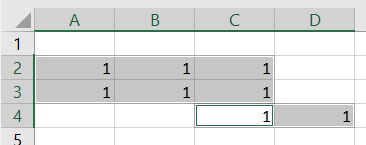
而使用GcExcel,结果是$A$2:$B$3,$C$2:$C$4,$D$4